

If you own a BMW or MINI, you’ve probably seen a service reminder come up when you start the car. Maybe it says engine oil is due, shows a date for brake fluid, or gives you a warning message that disappears before you really get a chance to read it.
The good news is that most of that information doesn’t disappear. Your BMW or MINI keeps your service information and stored messages right in the vehicle, and once you know where to look, it’s actually pretty easy to check.
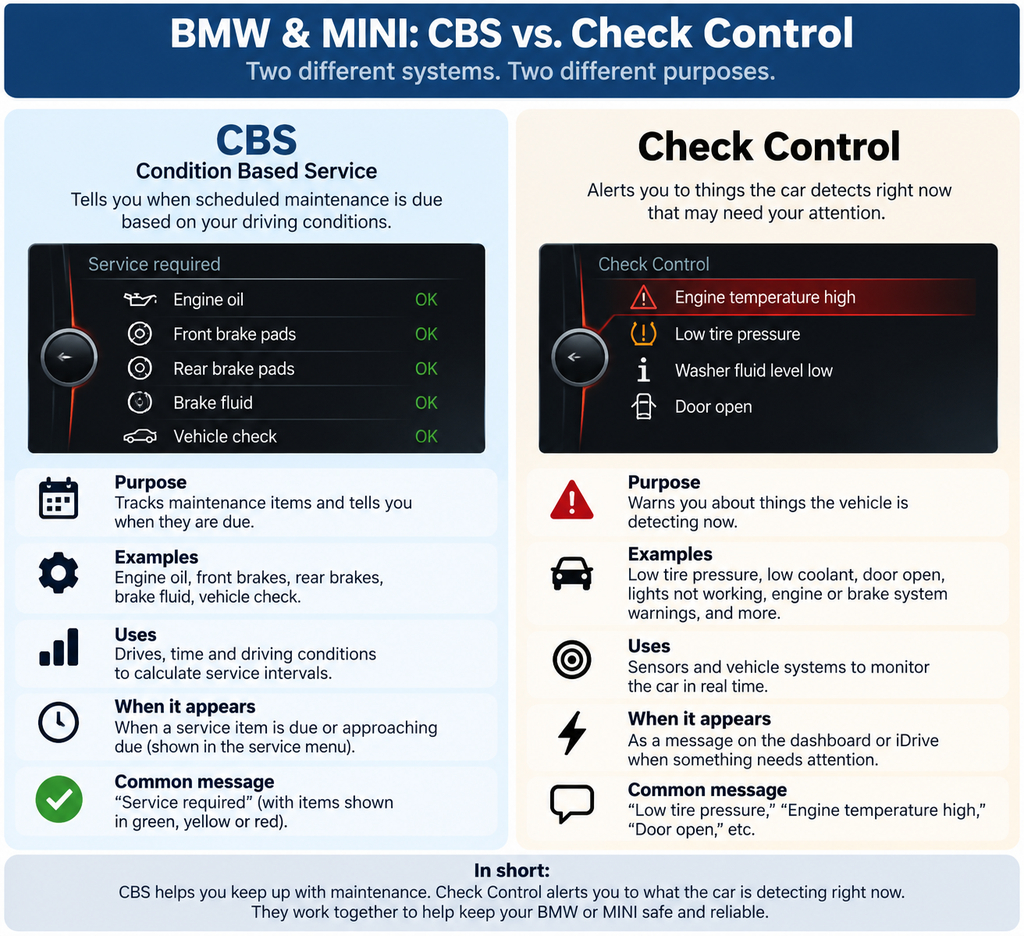
BMW and MINI call the maintenance side of this system Condition Based Service, or CBS. It keeps track of individual service items and helps you see what’s due, what’s coming up, and when it needs attention.

1. What Is BMW & MINI CBS and How Does It Work?
CBS stands for Condition Based Service. Think of it as the car keeping its own running list of upcoming maintenance.
You may also hear people refer to the BMW service light, service reminder, or maintenance reminder. Those are the reminders you see as maintenance approaches, while CBS is the system keeping track of the individual service requirements.
As you drive, your BMW or MINI collects information about how the vehicle is being used. For certain services, CBS uses that information along with mileage and time to determine when maintenance is coming due. So two similar BMWs with the same mileage won’t necessarily show exactly the same service needs.
The useful part is that CBS keeps track of each service item separately. An oil service might be due soon, while brake fluid could still be months away and the brakes may have thousands of miles remaining.
The information continues to update as the car is driven, giving you a current picture of what needs attention and when.
Next, we’ll look at exactly which services CBS can track and display.
2. What Services Does BMW & MINI CBS Monitor and Display?
When you open the service menu, you won’t just see one general “service due” reminder. CBS breaks the maintenance down into individual items, so you can quickly see what’s coming up and what needs attention first.
On many BMW and MINI models, you’ll commonly see:
- Engine oil service
- Front brake service
- Rear brake service
- Brake fluid
- Vehicle check
Your car may show a date, remaining mileage, or both, depending on the service. For example, brake fluid is generally shown by date, while engine oil may show both time and mileage.
The exact list can vary by model, year and equipment, so don’t be surprised if your CBS screen looks a little different from another BMW or MINI.
Does BMW & MINI CBS Track Every Maintenance Item?
No. CBS doesn’t necessarily list every maintenance item your BMW or MINI needs. It’s the car’s built-in service tracking system, but it doesn’t replace the vehicle’s maintenance history or model-specific maintenance requirements.
There may be other maintenance or repairs your vehicle needs that aren’t shown as individual items on the CBS screen.
3. How Do I Check What Service My BMW or MINI Needs and When It’s Due?
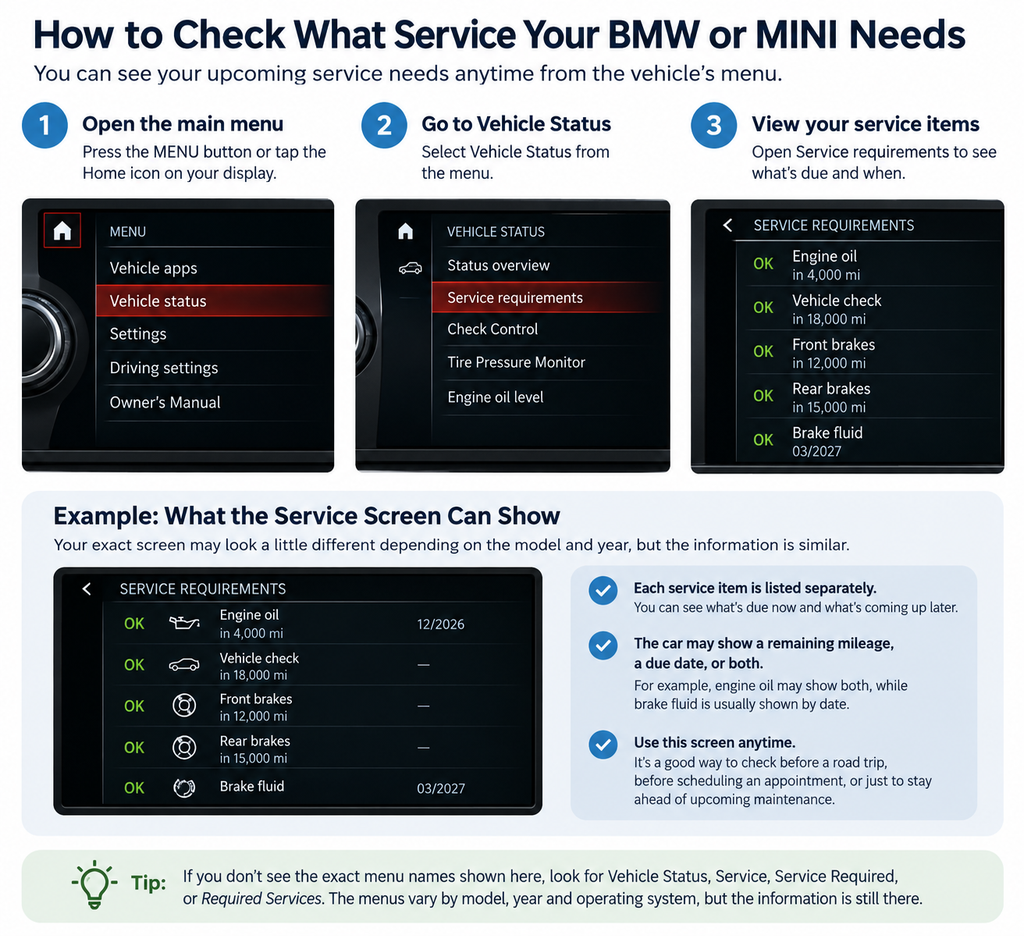
You don’t have to wait for a service reminder to pop up on the dashboard. You can check what service your BMW or MINI needs and when it’s due right from the car.
Start by looking for Vehicle Status in the vehicle’s menu. From there, look for the service menu, which may be called Service Required, Required Services, Service Requirements, or something similar depending on your BMW or MINI.
Once you’re there, you’ll see the individual services your car is currently keeping track of. Select a service item and you’ll be able to see when it’s due. Depending on the service, the car may show remaining mileage, a due date, or both.
If your screen doesn’t look exactly like the example below, that’s normal. BMW and MINI have changed their menus quite a bit over the years, but the service information is generally found under Vehicle Status or the vehicle’s service menu.
4. What Do the BMW & MINI Service Symbols and Colors Mean?
The CBS screen is actually pretty simple once you know what you’re looking at.
You’ll usually see a small group of symbols for services such as engine oil, front brakes, rear brakes, brake fluid, and vehicle check. The exact symbols can vary a little between BMW and MINI models and generations.
The easiest way to read the screen is:
The symbol tells you what service it is. The color tells you when it needs attention.
There are generally three service-status colors:
- Green — service isn’t due yet.
- Yellow — service is coming due soon. This is usually advance notice that a service is approaching its mileage or due date. It doesn’t necessarily mean you need the service today—think of yellow as “time to start planning.”
- Red — service is due or overdue. The mileage or date for that service has been reached or passed.
The symbol itself generally stays the same. For example, the engine oil symbol remains the engine oil symbol, while its status changes as the service gets closer to its due date.
If you’re unsure about a symbol, select it. The car will usually show more information about that service, including its remaining mileage, due date, or current status.
5. BMW & MINI “Service Required”: What Does It Mean and Can I Still Drive?
If your BMW or MINI says “Service Required,” don’t panic. In most cases, it means one of the maintenance items tracked by CBS is due or overdue. It doesn’t automatically mean something is wrong with the car.
The first thing to do is check your service menu to see which item is asking for attention. It could be something as simple as an oil service, brake fluid, brake service, or Vehicle Check.
Can I Still Drive My BMW or MINI if It Says “Service Required”?
Usually, yes. A “Service Required” message by itself is generally a maintenance reminder, not a message telling you to stop driving.
But check what service is due rather than ignoring it. And if you also have a separate warning for something like engine temperature, oil pressure, or the brake system, that’s different. Those warnings can require immediate attention.
Why Does My BMW or MINI Still Say “Service Required” After a Service?
If you just had your BMW or MINI serviced and the message is still there, there are two common reasons:
The service wasn’t reset. After certain maintenance is completed, the corresponding CBS service item needs to be reset. If it wasn’t, the car may continue showing the old service reminder.
Or another service is due. CBS tracks each maintenance item separately, so resetting the oil service won’t clear a brake-fluid or Vehicle Check reminder.
Before assuming something was missed, open the CBS service menu and see which service is actually showing due.
Can I Reset the BMW or MINI Service Reminder Myself?
On many BMW and MINI models, CBS service reminders can be reset through the vehicle after the maintenance has been completed. The exact procedure varies depending on the model and year.
The important part is that a CBS service item should only be reset after that service has actually been performed. Resetting the reminder doesn’t perform the maintenance—it simply starts a new service interval.
6. What Is a BMW or MINI Check Control Message?
A Check Control message is your BMW or MINI’s way of telling you that something in the vehicle needs your attention.
This is different from CBS. CBS is mainly about scheduled maintenance. Check Control is about what the car is detecting right now.
A Check Control message might be something simple, such as:
- Low washer fluid
- A door or trunk left open
- Low tire pressure
- A light that’s not working
- Low coolant
But Check Control can also alert you to more important problems involving the engine, brakes, drivetrain, charging system, or other vehicle systems.
Not every message means the same thing—or has the same urgency. Some are simply informational, while others may tell you to drive carefully, have the vehicle checked soon, or stop the vehicle.
The useful part is that many of these messages can be checked again after they disappear from the dashboard. We’ll show you where to find them next.
7. How Do I Check BMW & MINI Warning Messages and What Do They Mean?
A warning pops up on your BMW or MINI, you hear the chime, and a few seconds later the message is gone. Now you’re wondering what it said—and whether you should be worried.
The good news is that many BMW and MINI warning messages can be checked again through Check Control.
Look in the vehicle menu for Check Control or Check Control Messages. On many models, you’ll find it under Vehicle Status, although the location can vary depending on the model and year.
Open the message and you’ll usually get more information than the dashboard symbol gives you. It may tell you what the car detected and what you should do next.
If the warning disappeared, check the stored messages. A message disappearing from the screen doesn’t necessarily mean the problem disappeared. Some Check Control messages are only shown briefly and can still be viewed afterward.
One useful tip: if you get a warning you’re unfamiliar with, take a picture of the full message when it’s safe to do so. The exact wording can be very helpful if you’re researching the problem or explaining it to your repair shop.
8. Can I Check My BMW or MINI Service Status on My Phone?
Yes. If your BMW or MINI supports connected services, you may be able to check some of the same vehicle information from the My BMW App or MINI App without sitting in the car.
Depending on the vehicle, the app can show things like upcoming service needs, service dates, vehicle status, and certain Check Control messages.
This can be especially useful when you’re trying to remember what service the car was asking for after you’ve already parked and walked away.
Just keep in mind that what you can see in the app depends on your model, year, equipment, software, and connected-services availability. Older BMWs and MINIs may show less information—or may not support the feature at all.
If you’ve had your BMW or MINI serviced with The BMW Guy before, we can also look at your service history with our shop. That can help confirm what we’ve already performed, when it was done, and what may be coming up next.
And if the information in the app and the car ever seem different, check the vehicle itself first. That’s where you’ll find the current CBS and Check Control information.
9. Why Does My BMW or MINI CBS Mileage Keep Changing, and How Accurate Is It?
Ever check your BMW’s service menu and think, “Wait, didn’t it say I had more miles left last time?” That’s normal.
CBS doesn’t always count down one mile for every mile you drive. For some services, the estimate can change as the car gets more information about how it’s actually being driven. Short trips, longer highway drives, time, mileage, and other operating conditions can affect certain CBS estimates.
How Accurate Is BMW CBS, Especially for Brake Pad Mileage?
CBS is a good tool for knowing when service is getting close, but don’t treat every number as an exact measurement.
Brakes are a good example. If CBS says you have 5,000 miles remaining, that doesn’t guarantee your brake pads will last exactly another 5,000 miles. The number is an estimate, and the actual brakes can be inspected to see how much material is really left.
And this is important: CBS doesn’t know the actual condition of every part on your car. It can’t look at a worn belt, find a leaking hose, see a cracked bushing, or know that another part is getting close to replacement just because you’re looking at the CBS screen.
That’s why CBS is great for keeping track of scheduled service, but it doesn’t replace an actual vehicle inspection.
So if your CBS mileage changes faster or slower than expected, that doesn’t necessarily mean anything is wrong. The car may simply be updating its estimate as you drive.
BMW & MINI Service and Maintenance in San Marcos, CA
CBS makes it much easier to keep up with your BMW or MINI’s maintenance. Once you know where to look, you can see what service is coming up, when it’s due, and what the car is trying to tell you instead of waiting for a reminder to catch you by surprise.
We recommend checking your CBS service status from time to time, even when there isn’t a reminder on the dashboard. You certainly don’t need to check it every day, but taking a quick look every few weeks or before a longer trip can help you see what’s coming and plan ahead.
It’s also a good idea to check CBS before scheduling an appointment. You may find that another service is coming due soon and can decide whether it makes sense to address it during the same visit.
At The BMW Guy in San Marcos, BMW and MINI service is what we do every day. We can look at what’s showing in your CBS, verify what service is actually due, check the vehicle’s condition, and help you separate what needs attention now from what can wait.
If you’re already one of our customers and you’re not sure what a warning or message on your BMW or MINI means, just contact us. Send us a picture of the message if you can—we’ll help you understand what the car is telling you and whether it needs attention right away.
And if you’ve serviced your vehicle with us before, we can also look back at its service history with our shop so we’re not recommending something you’ve already taken care of.
We serve BMW, MINI, and European vehicle owners throughout San Marcos, Oceanside, Vista, Carlsbad, Poway, Rancho Bernardo, San Elijo Hills, and other communities throughout North County San Diego.
Call us:
760-716-4677
Stop by:
1288 W. San Marcos Blvd, San Marcos CA 92078
Shop hours:
Monday – Friday
8am to 5pm
Saturday
9am – 4pm
After hours key drop available 24/7.